add-circle-bold add-circle add-square add alarm-bell-1 alert-diamond analytics-pie-2 archive archive arrow-down-1 arrow-down-2 arrow-left-1 arrow-right-1 arrow-up-1 attachment-1 bin-paper-1 book-star button-record check-1 check-circle-1 close close-quote close cog-1 cog common-file-stack copy-paste credit-card-1 diagram-fall-down disable time-clock-midnight download-thick-bottom drawer-send envelope-letter envelope-letter expand-6 expand-6 file-code filter-1 floppy-disk flying-insect-honey folder-file-1 headphones-customer-support hierarchy-9 hyperlink-2 information-circle keyboard-arrow-down keyboard-arrow-up layout-module-1 list-bullets lock-2 lock-unlock-1 love-it messages-bubble-square move-to-top multiple-circle multiple-neutral-1 multiple-users-1 navigation-menu-horizontal navigation-menu network-browser open-quote pencil-1 pencil-write pencil-1 print-text rating-star rating-star remove-circle remove-square-1 search send-email-1 shield-warning single-neutral-actions single-neutral smiley-sad-1 smiley-unhappy smiley-indifferent smiley-smile-1_1 smiley-happy smiley-sad-1 smiley-unhappy smiley-indifferent smiley-happy smiley-thrilled social-media-twitter synchronize-arrows-1 tags-double ticket-1 ticket-1 time-clock-circle undo view-1 view-off view wench

How to Funding


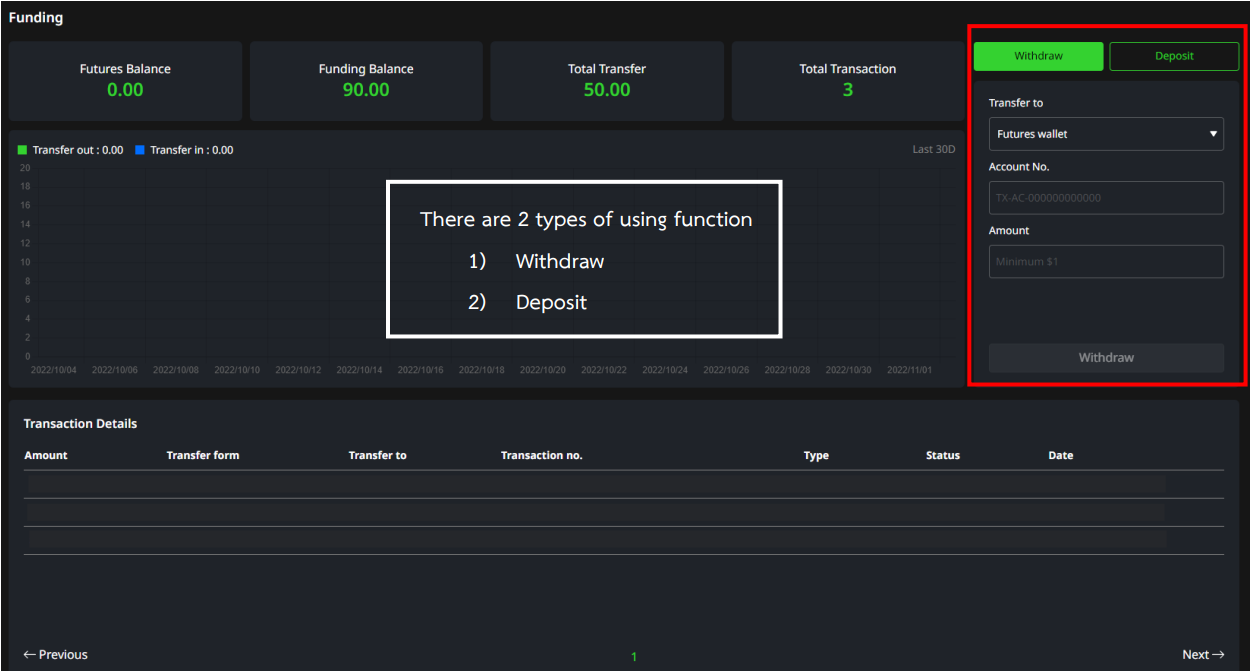
There are 2 types of using function

  • Withdraw
  • Deposit


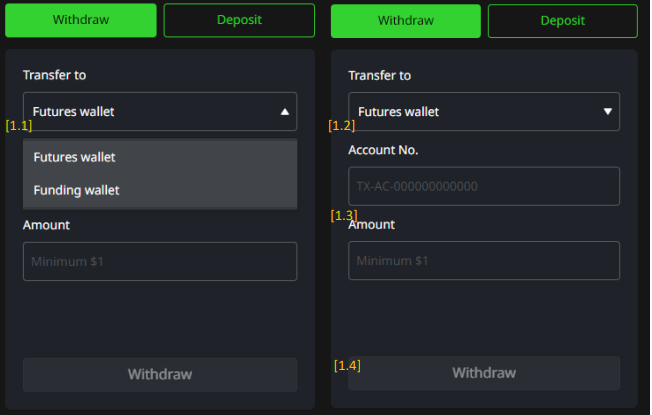
1) Withdraw

(Withdraw) > Used for transfers to another account under 1000X platform.

(1.1) Transfer to > Select type of wallet

          - Future

          - Funding

(1.2) Account No. > Enter the account number under 1000X Platform.

(1.3) Amount > Enter the amount of USD that you wish to transfer. 

Minimum transfer amount is 1 USD.

(1.4) Once validated, Click Withdraw.

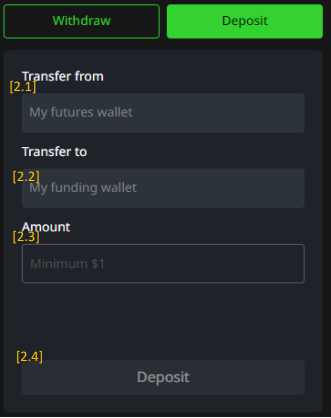
2) Deposit

(Deposit) > Used for internal-account transfers. (My Future Wallet to My Funding Wallet)

(2.1) Transfer from > Display transfers from My Future Wallet

(2.2) Transfer from > Display transfers to My Funding Wallet

(2.3) Amount > Enter the amount of USD that you wish to transfer. 

Minimum transfer amount is 1 USD

(2.4) Once validated, Click  Deposit


Condition of Deposit

Transfer from My Future wallet to My Funding wallet 

1. Credit will be adjusted to 0 if transfer is made. 

2. Unable to transfer if there are orders in process

3. Unable to transfer if mismatch turnover conditions

4. Minimum transfer amount is 1 USD


Disclaimer : Any form of Investment are subject to risk, keep in mind to evaluate, manage your assets and risk at your own discretion.