
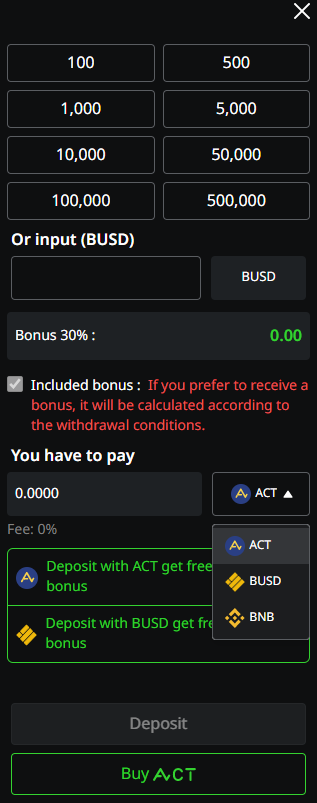
Deposit
1) Click the “Deposit” Menu
1.1) Choose the preset amount.
1.2) Manually put the preferred amount (Minimum $10)
2) The platform will calculated the credit amount receiving from deposit program, user can choose whether or not to receive the credit.
3) To confirm the transaction, click the “Deposit” button.
- Deposit with Cryptocurrencies such as BNB, BUSD or ACT will be calculated from
the price at the moment of deposition.1000X Deposit are compatible with Cryptocurrencies such as BNB, BUSD or ACT.
- Deposit with ACT get free 30% credit bonus (Get a 30% credit bonus on every deposit via ACT)
- Deposit with BUSD, free 30% will be offered.
Remark : Please be reminded that if user accepted the bonus, the additional conditions will be applied to your account, including the turnover conditions
(Learn about our Promotion)
- User can buy/swap the ACT by clicking “Buy ACT” button.
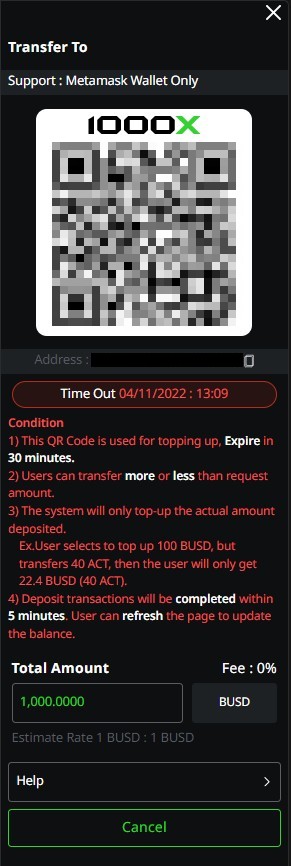
4) Transferring Process
4.1) The QR Code will be displayed for user to scan and transfer the chosen asset. Deposit order will be expired in 1 hour.
4.2) Copy the Address to the Metamask for transferring.
Remark: Can Deposit with any exchanges that working under BEP20, Confirmly that exchange was listing ACT before start the transaction.
Condition
1) QR Code is available for transferring in 30 minutes.
2) The transferring amount depends on the users, Added balance into the account is not related to the request amount.
3) Added balance will be equally to the actual transferred amount from user only.
Example: Request deposit order for $100 (56 ACT), Actual transferred was 40 ACT ($22.4) only 22.4 USD (40 ACT) will be added to the account.
4) Transaction process would take between 5 minutes window. Reloading the account to check if balance is correctly added.
Disclaimer : Any form of Investment are subject to risk. Keep in mind to evaluate, manage your assets and risk at your own discretion.