add-circle-bold add-circle add-square add alarm-bell-1 alert-diamond analytics-pie-2 archive archive arrow-down-1 arrow-down-2 arrow-left-1 arrow-right-1 arrow-up-1 attachment-1 bin-paper-1 book-star button-record check-1 check-circle-1 close close-quote close cog-1 cog common-file-stack copy-paste credit-card-1 diagram-fall-down disable time-clock-midnight download-thick-bottom drawer-send envelope-letter envelope-letter expand-6 expand-6 file-code filter-1 floppy-disk flying-insect-honey folder-file-1 headphones-customer-support hierarchy-9 hyperlink-2 information-circle keyboard-arrow-down keyboard-arrow-up layout-module-1 list-bullets lock-2 lock-unlock-1 love-it messages-bubble-square move-to-top multiple-circle multiple-neutral-1 multiple-users-1 navigation-menu-horizontal navigation-menu network-browser open-quote pencil-1 pencil-write pencil-1 print-text rating-star rating-star remove-circle remove-square-1 search send-email-1 shield-warning single-neutral-actions single-neutral smiley-sad-1 smiley-unhappy smiley-indifferent smiley-smile-1_1 smiley-happy smiley-sad-1 smiley-unhappy smiley-indifferent smiley-happy smiley-thrilled social-media-twitter synchronize-arrows-1 tags-double ticket-1 ticket-1 time-clock-circle undo view-1 view-off view wench

Register


Before you can start trading, You must register to be able to login. 
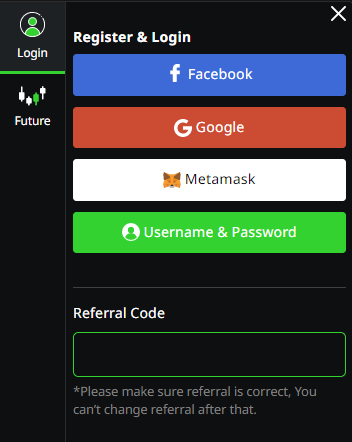


 There are 3 ways to register.

Facebook

Google (Gmail)

Metamask

**Referral Code - Optional

1.Enter 1000x.live

2.One the left-hand side of the user bar, Select "Profile"


Facebook

1.In the "Register & Login" Section, Select "Facebook"

2.Fill in the email or phone number used to sign up with Facebook account

3.Enter your Facebook account password

4.Click the Button "Login"                                                                                                                                                                                                                                                                                                                                                                                                                                                                                


Google (Gmail)
1. Select "Google "
2. Fill in your email address
3. Enter your password
4. Click "Next"
5. Done                                                                                                                                                                                                                                                                                                                                                                                                                                                                                                                  


1. Select "Google "
2. Fill in your email address
3. Enter your password
4. Click "Next"
5. Done


Metamask


For applying with Metamask, you must open URL : https://www.1000x.live via Browser in Metamaskonly.
1. Select "Metamask"
2. Choose your preferred Address wallet to be connected.
3. Select "Next"
4. To confirm the connection with your wallet. Select "Connect"
5. To confirm the sign-in with your wallet. Select "Sign"


Illustrations for users who have successfully applied